"Agents drawing diagrams" is the next big thing since "Agents writing prose".
Diagrams are more effective at communicating ideas than prose alone, and LLMs are great at
drawing and updating these diagrams quickly. But it's easy to get caught up in the
complexities of how to lay out components, and keep them looking neat. This is where "diagrams
as code" tools like D2, Mermaid and Reladraw are effective for keeping conversations focused
on content without worrying about the layout.
LLMs read and write D2, Mermaid, and Reladraw script directly,
without needing to see diagrams laid out or rendered. This means a 90% reduction of token
spend versus using an SVG directly, and makes feedback much faster. With this comparison, plus
D2's newly open-sourced TALA renderer,[1] I'll be switching to D2 for my
system design diagrams, and following Reladraw with interest.
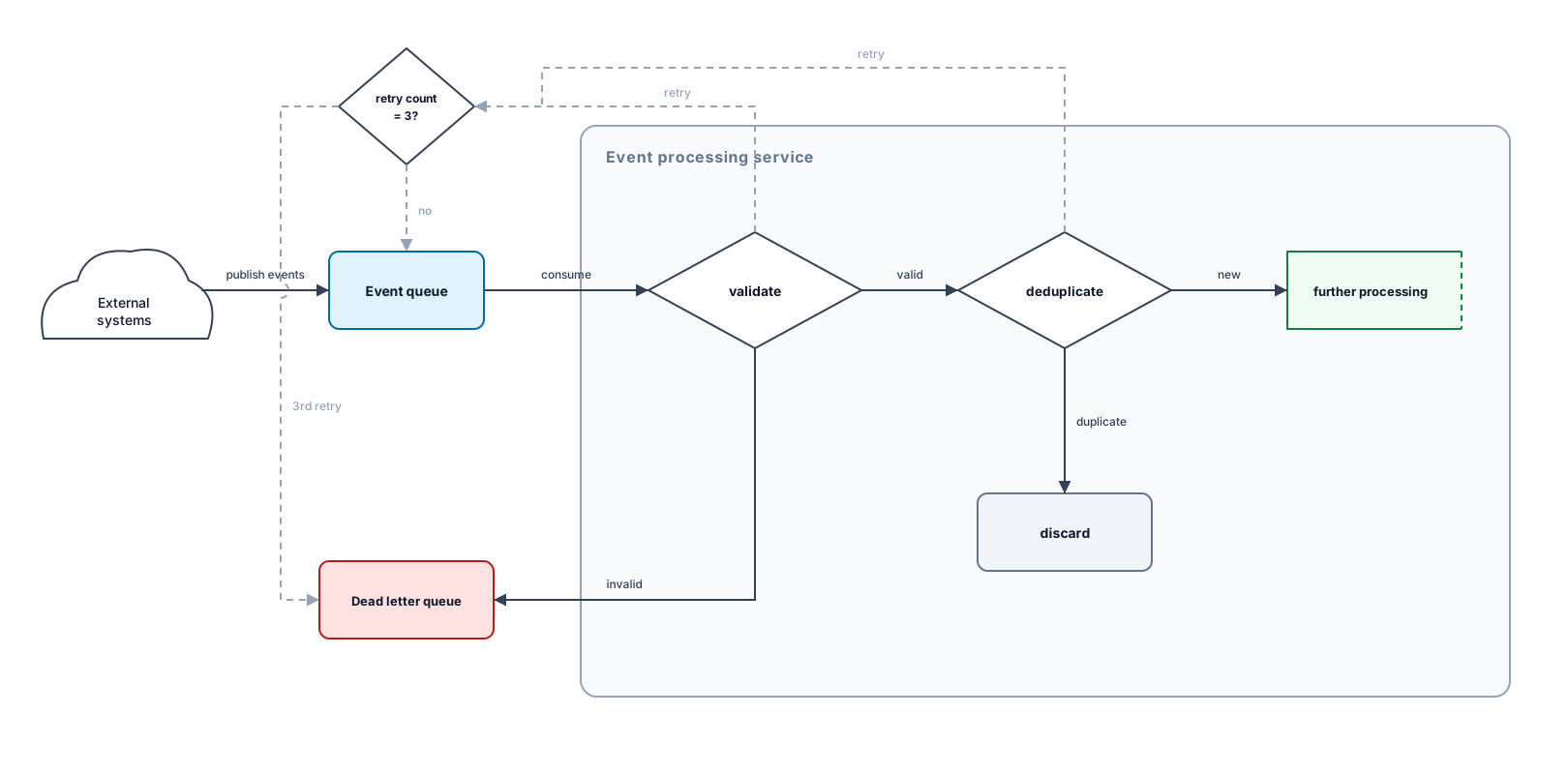
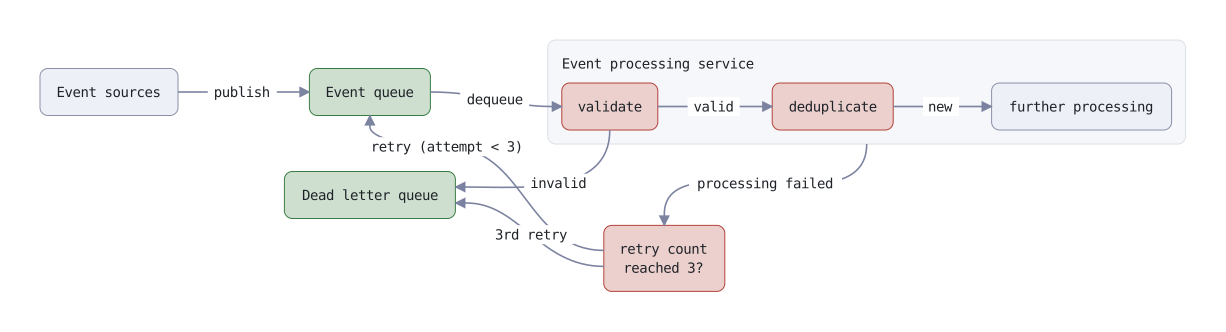
Throughout this article we'll focus on a simple event processing service, rendering it as D2,
Mermaid, Reladraw and freestyle SVG diagrams. Notice the difference between constraint-based,
layered, relative and freestyle layouts.
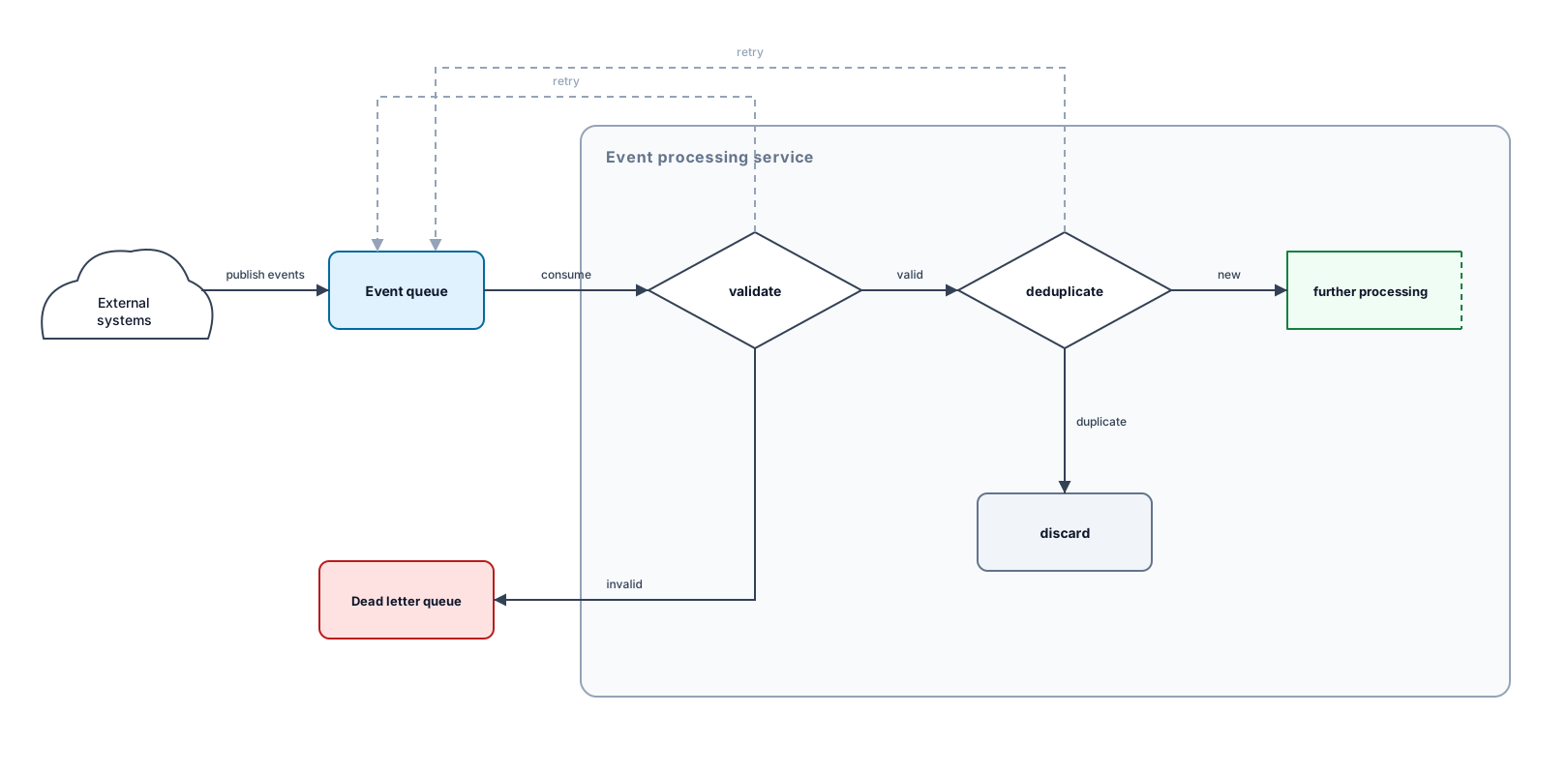
D2 with the TALA constraints engine
Mermaid with the Dagre layering engine
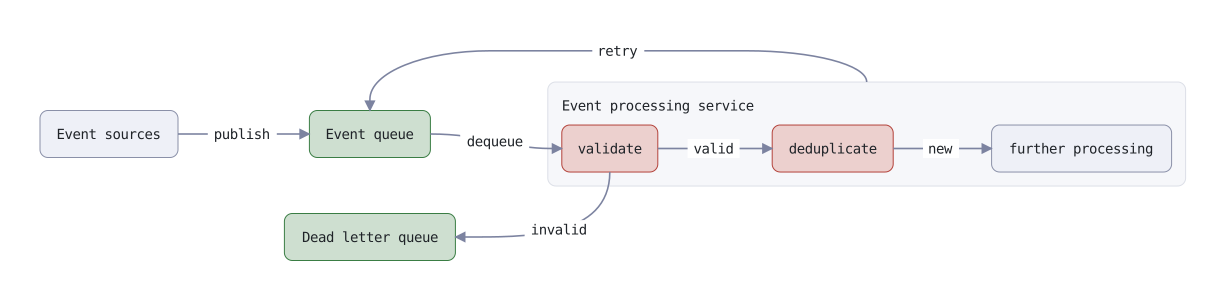
Reladraw with relative placement
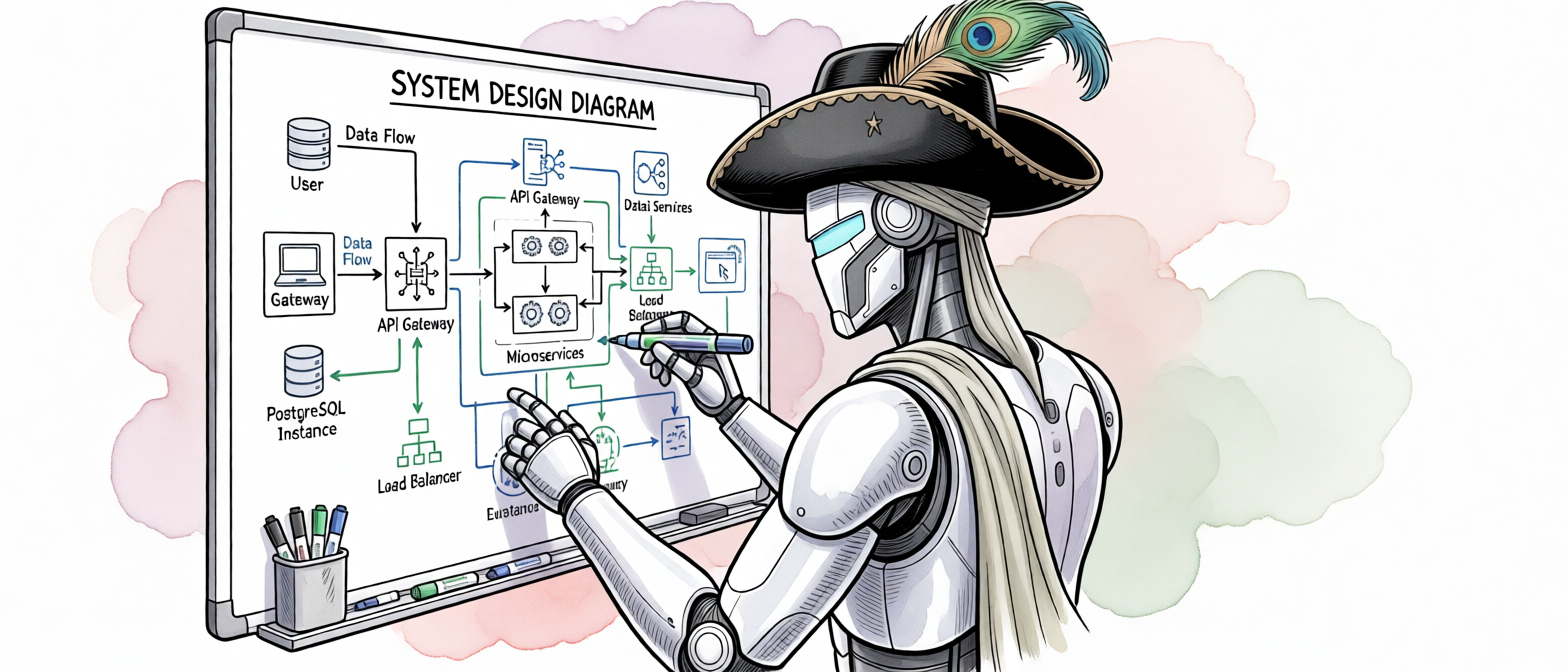
SVG laid out manually by the LLM
All of the conversations, diagrams and token metrics were captured through my
Diagram Chat tool (which renders
D2, Mermaid and Reladraw client-side), and
deepseek-4.1-flash as the
LLM.
Updating a D2 diagram
Consider this chat conversation with an LLM. We can request a simple change to a diagram,
passing in the D2 script. The chat client renders the diagrams to SVG, but the LLM operates on
the script directly and never sees the rendered diagram.
User
Update this D2 diagram. A new decision node between the service and the queue. if it's the
3rd retry, send it to the deadletter queue.
Just one turn, and the tokens have already taken a bite out of the context window:
2,113 in, 15,017 out (12,739 reasoning + 2,278 response).
Updating a Mermaid diagram
The D2 and SVG diagrams contrasted on token consumption, but Mermaid is a more fair
comparison. Let's make a similar change.
User
Update this Mermaid diagram. A new decision node between the service and the queue. if
it's the 3rd retry, send it to the deadletter queue.
mermaid
flowchart LR
    ES@{ shape: cloud, label: "Event sources" }
    EQ[["Event queue"]]
    DLQ[["Dead letter queue"]]

    subgraph EPS["Event processing service"]
        direction LR
        V{"Validate"}
        D{"Deduplicate"}
        FP["Further processing …"]
        DISC["Discard"]
    end

    ES -->|"publish events"| EQ
    ES -->|"undeliverable events"| DLQ
    EQ -->|"deliver batch"| V
    V -->|"valid"| D
    V -->|"invalid"| DLQ
    D -->|"new"| FP
    D -->|"duplicate"| DISC
    V -.->|"retry"| EQ
    D -.->|"retry"| EQ
Assistant
Here's the diagram with the new decision node.
mermaid
flowchart LR
    ES@{ shape: cloud, label: "Event sources" }
    EQ[["Event queue"]]
    DLQ[["Dead letter queue"]]
    RC{"3rd retry?"}

    subgraph EPS["Event processing service"]
        direction LR
        V{"Validate"}
        D{"Deduplicate"}
        FP["Further processing …"]
        DISC["Discard"]
    end

    ES -->|"publish events"| EQ
    ES -->|"undeliverable events"| DLQ
    EQ -->|"deliver batch"| V
    V -->|"valid"| D
    V -->|"invalid"| DLQ
    D -->|"new"| FP
    D -->|"duplicate"| DISC
    V -.->|"retry"| RC
    D -.->|"retry"| RC
    RC -.->|"yes"| DLQ
    RC -.->|"no"| EQ
Mermaid's token consumption is much better:
397 in, 696 out (475 reasoning + 221 response). But the
layout is starting to get weird...
Updating a Reladraw diagram
Reladraw
is a newcomer to the scene.[2] It will lay out components relative to each
other, but without an auto-resolving layout engine it requires the definition file to describe
the layout unambiguously.
With Mermaid, D2 and SVG we benefit from the LLM's existing knowledge of how to build these
diagrams, but with Reladraw we need to provide additional guidance. For
Diagram Chat I loaded a trimmed
version of Reladraw's
SYNTAX.md
into the system context. It covers node placement, edges and styles, which is enough for the
LLM to work with.
User
Update this Reladraw diagram. A new decision node between the service and the queue. if
it's the 3rd retry, send it to the deadletter queue.
reladraw
style decision  fill: theme-secondary-subtle  border: theme-secondary
style q  fill: theme-primary-subtle  border: theme-primary

node sources "Event sources"

node queue "Event queue"  right of sources  style: q

node service "Event processing service"  right of queue
node service.validate "validate"  style: decision
node service.dedupe "deduplicate"  right of service.validate  style: decision
node service.process "further processing"  right of service.dedupe

node dlq "Dead letter queue"  below queue  style: q

edge sources -> queue "publish"  from: right  to: left
edge queue -> service.validate "dequeue"  from: right  to: left
edge service.validate -> service.dedupe "valid"  from: right  to: left
edge service.validate -> dlq "invalid"  from: bottom  to: right
edge service.dedupe -> service.process "new"  from: right  to: left
edge service -> queue "retry"  from: top  to: top
Assistant
Here's the diagram with the new decision node.
reladraw
style decision  fill: theme-secondary-subtle  border: theme-secondary
style q  fill: theme-primary-subtle  border: theme-primary

node sources "Event sources"

node queue "Event queue"  right of sources  style: q

node service "Event processing service"  right of queue
node service.validate "validate"  style: decision
node service.dedupe "deduplicate"  right of service.validate  style: decision
node service.process "further processing"  right of service.dedupe

node retry "retry count / reached 3?"  below service  right of dlq  style: decision
node dlq "Dead letter queue"  below queue  style: q

edge sources -> queue "publish"  from: right  to: left
edge queue -> service.validate "dequeue"  from: right  to: left
edge service.validate -> service.dedupe "valid"  from: right  to: left
edge service.validate -> dlq "invalid"  from: bottom  to: right
edge service.dedupe -> service.process "new"  from: right  to: left
edge service -> retry "processing failed"  from: bottom  to: top
edge retry -> queue "retry (attempt < 3)"  from: left  to: bottom
edge retry -> dlq "3rd retry"  from: left  to: right
The input count includes the trimmed syntax guide, so it's higher than D2 or Mermaid. Even so,
the count is reasonable:
1,190 in, 1,331 out (1,013 reasoning + 318 response). The
layout isn't ideal but it's salvageable; unlike Mermaid or D2, we can guide the LLM into
repositioning the new decision node and arrows.
Direct comparisons
The tokens in this chart are samples. In practice, I saw ±40% variance in these, depending on
how long the LLM took to think, and the complexity of its response. However the
scale still stands.
Input
System prompt
User prompt
Output
Reasoning
Response
D2
SVG
Mermaid
Reladraw
Input tokens
361
2,113
397
1,190
Reasoning tokens
460
12,739
475
1,013
Response tokens
206
2,278
221
318
Describing a diagram is cheaper than drawing it
D2, Mermaid and Reladraw are diagram languages: the source describes nodes and the edges
between them, and a renderer turns that into coordinates and paths. SVG is a graphics format,
so the LLM has to work out every coordinate itself. D2 and Mermaid produce similar token
counts, and Reladraw uses roughly twice as many. SVG is around 20 times more expensive than
D2. Some of that is the verbosity of the format, but most of it is the LLM working out the
layout during the "reasoning" stage.
Who decides where things go?
The diagram languages differ in how much of the layout they leave to the renderer:
D2 diagrams with the
TALA engine use a constraint-based model, also
placing every node automatically.
Reladraw has no layout engine. The definition places each node explicitly,
relative to another (e.g. right of,
below).
TALA's constraint-based layout optimises for short edges and balanced whitespace. Dagre and
ELK's layered graph style assigns every node to a discrete rank. Each rank becomes a column,
and the diagram grows horizontally. With automatic layout, the LLM only describes what
connects to what. The trade-off is that you accept wherever the engine puts things, and a
small change can shuffle the whole diagram.
Without a layout engine, Reladraw puts you in control of where every node goes. The trade-off
is that the LLM needs more hand-holding: a syntax guide in its context, and more reasoning
about placement to get the layout right.
There are no guarantees with freestyle SVG. Every coordinate and path string is a token
deliberately produced by the LLM, but you can't verify its correctness without inspecting it
visually.
What's next?
LLMs can generate D2 code as comfortably as Mermaid code, but most agent tooling can't render
it yet. Mermaid shows up extensively in markdown documents and LLM harnesses, while D2 has far
less support. I built
Diagram Chat with a custom
rendering plugin to test D2 with TALA alongside Mermaid, Reladraw, and SVG, and most agent
harnesses would need similar work. Now that TALA is open-sourced,[1]
though, it could land in Mermaid itself, which would also close that gap. It's also possible
to introduce an LLM to a new diagramming syntax like Reladraw, at the cost of adding to the
system context.
In the meantime, for iterating on diagrams over several turns, D2 with TALA is the format that
holds up, and it's possible to convert an existing diagram to Reladraw if you need finer
grained positioning of components. You may need to vibe-code your own renderer, but it's
worthwhile for the diagram quality and token consumption.
;fill-rule:nonzero;stroke:%23000;stroke-width:48.7px;'/%3e%3cdefs%3e%3clinearGradient%20id='_Linear1'%20x1='0'%20y1='0'%20x2='1'%20y2='0'%20gradientUnits='userSpaceOnUse'%20gradientTransform='matrix(2406.25,-2101.13,2101.13,2406.25,1086.43,2157.14)'%3e%3cstop%20offset='0'%20style='stop-color:%232d1f30;stop-opacity:1'/%3e%3cstop%20offset='1'%20style='stop-color:%239f5060;stop-opacity:1'/%3e%3c/linearGradient%3e%3c/defs%3e%3c/svg%3e)






 All articles
 About Sinclair Studios