

Building a data platform by lifecycle stage
If you're building a data platform that you and your team will be maintaining for years, a good practice is to align its design with a data management process. This keeps us focused on all stages of the data's lifecycle, and forces us to be deliberate about how different stages interact with the data.
Without clear boundaries, one part of a data platform reaches into another's work, or acts on data that hasn't been processed yet. Instead, we split the platform along the data's lifecycle, so each stage is an isolated module with its own behaviour, and clear contracts with neighbouring stages.
Data management lifecycle architecture
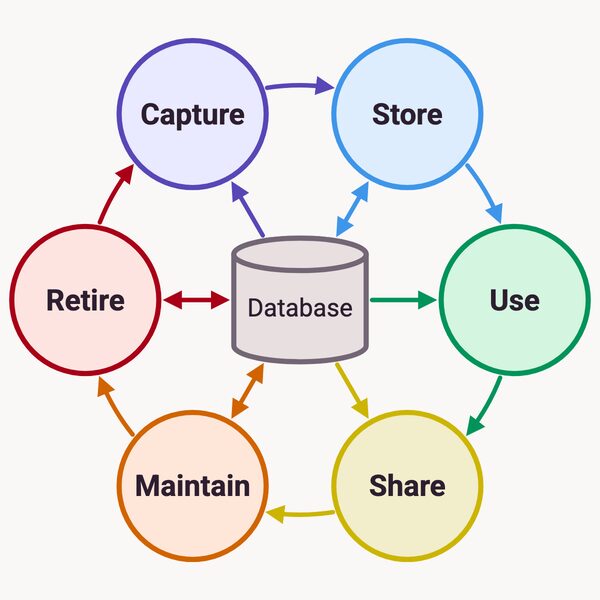
At a recent engagement, I architected a data platform based on the NSW government's data management lifecycle.[1] Each stage is a module with distinct responsibilities, and separate interaction strategies with the central database:
Each stage has relatively high autonomy, almost like microservices. Each stage retains their own controllers, interfaces, and some internal data models:
- Capture accepts raw input from external systems, and parses it into validated objects.
- Store writes validated objects to the database, creating new or patching existing records.
- Use performs analysis or evaluation on newly updated records.
- Share makes records available to collaborators, sync or async.
- Maintain runs data migrations, backfills and routine maintenance jobs.
- Retire deletes or archives data once it passes its retention period, or on demand.
Neighbouring modules can interact directly through typed contracts, and have restricted access to resources. For example, Capture doesn't write to the database, and Store doesn't receive data from external systems.
Worked example
To see how this works in practice, let's follow an example Customer Data Platform stage by stage.
Work begins
Data platforms are all about the data, so let's start with a database. There's no way in or out yet.
Our service will perform a variety of customer data tasks, but for now we're going to focus on age-based eligibility: Identifying what functionality our customers are able to access, based on their age assurance.
Capturing age assurance
We rely on a 3rd party provider to perform age assurance checks on customers, so we don't need to handle sensitive data ourselves. Once the provider makes their assessment, we forward the data to a Capture endpoint.
Capture treats it as raw input, and performs additional processing to verify its correctness, such as making sure the customer exists.
Gathering additional details
The age verification assurance includes a "customer token" identifier (see
 Share tokens instead of IDs), and the
Capture stage makes a
read-only call to the database to check if we have a record for this customer yet.
In this case, we don't, so we ask the contacts service for the customer's email address in preparation for a new customer record.
Storing a new customer
After the Capture has parsed the customer, it passes the object to Store.
We're using the parse, don't validate[2] structural invariant
pattern. Store's interface requires a ValidatedAgeAssurance,
so it can trust the object is valid without re-running any checks.
Store then inserts or updates the customer's record in the database.
Using the newly stored record
After Store has saved the new result, it signals Use that the customer is ready for evaluation.
In this case, Use reads the customer's record from the database and publishes an event on the eligibility events stream, indicating whether or not the customer may access age-restricted features.
Sharing customer records
While Use focuses on the platform's own requirements, Share hosts connectivity for other services to access customer records for their own requirements.
Share reads the records from the database and returns only what's stored. In this example, the reporting service prepares weekly reports on customers segmented by age.
Maintenance activities
Maintain hosts sensitive operations for data migrations, backfills and routine maintenance jobs.
It can change records more broadly than Store, so it's reachable only through admin interfaces, and other stages rarely call it.
End of life
Customer data is sensitive, so we have a process to securely redact or delete customer data when required. The Retire stage performs these activities.
When a customer closes their account or asks us to erase their data, the privacy service sends a request to Retire, which redacts their records and confirms the erasure back to the privacy service.
For compliance purposes, this stage must be working before the service operates on real data.
Feeding back to Capture
When the Retire stage redacts a customer record, we now know that we shouldn't store any more information about that customer. Feedback to Capture ensures that we discard any future data we may receive for that customer.
What else can we do with this?
Keeping each stage as its own module is only the beginning. The customer data platform
also emits metrics and logs events, so attaching
stage:${name} labels ensures we can track operations
separately, or audit a customer record across multiple stages.
Putting the stages together
Each stage is its own module, with its own responsibilities and database access constraints. Neighbouring stages interact through typed contracts, so nothing past Capture handles unvalidated data, and stage labels on metrics and logs show which stage did what.
The stage names also give the team a shared vocabulary, and the logical boundaries keep the platform maintainable as it grows.
Matching functionality with its stage
Over time, data platforms take on more and more features.
Where should we place
them?
References
- ⬆️ NSW Government, NSW Infrastructure Data Management Framework (PDF), section 7.1 "Data management life cycle"; archived web version. This article renames Archive / destroy to Retire, and the other stages take one word of each IDMF pair.
- ⬆️ Alexis King, "Parse, don't validate", 5 November 2019.
If you have feedback or questions about this article, let's catch up via email.

 All articles
 About Sinclair Studios